 |
AireEngine
A 3D Open-World Game Engine
|
Loading...
Searching...
No Matches
|
AireEngine
A 3D Open-World Game Engine
|
Public Member Functions | |
| WaterSurface (TextureManager *texManager, const Terrain *terrain, const Box2D ®ion, float height) | |
| ~WaterSurface () | |
| Free all resources associated with the water surface. | |
| void | render (const Window &window, const Clock &clock, Camera &camera, Terrain &terrain, ShaderProgram &terrainProg, Texture *skyboxTex) |
| void | toggleDepthSlowdown (bool turnOn, float slowdownDepth=-1.0f) |
| void | toggleSoftEdges (bool turnOn, float shoreFadeDepth=-1.0f) |
Public Attributes | |
| glm::vec3 | deepWaterColor |
| Colour in deep water. | |
| glm::vec3 | shallowWaterColor |
| Colour in shallow water. | |
| glm::vec3 | depthExtinction |
| glm::vec2 | windDir |
| 2D wind direction to control the waves on the surface | |
| float | windSpeed |
| A wind speed parameter to control the speed of the waves. | |
| float | height |
| Height of the water surface. | |
| float | heightDeepWater |
| float | horizontalExtinction |
| Colour extinction (from shallow to deep water colour) along the eye vector. | |
| float | waterClarity |
| Parameter to control how transparent the water is. | |
| float | uvTiling |
| WaterSurface::WaterSurface | ( | TextureManager * | texManager, |
| const Terrain * | terrain, | ||
| const Box2D & | region, | ||
| float | height ) |
Create a new water surface
| terrain | The underlying terrain. |
| region | World-space bounds of the water region (rectangle) |
| height | Height in world coordinates that defines the zero level of the water surface |
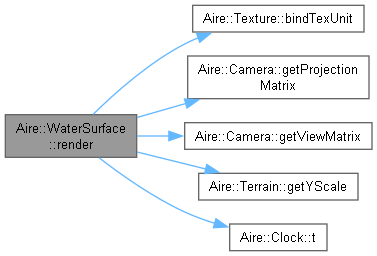
| void Aire::WaterSurface::render | ( | const Window & | window, |
| const Clock & | clock, | ||
| Camera & | camera, | ||
| Terrain & | terrain, | ||
| ShaderProgram & | terrainProg, | ||
| Texture * | skyboxTex ) |
Render the water surface
| terrain | The underlying terrain shader program to use |
| texManager | The texture manager to use |
| camera | The camera to render from |
| lightPos | The positions of the lights |
Turn on/off depth slowdown. This will make water move slower in shallow regions than it does in deep regions. Note that this is not a physically realistic modifier. @turnOn True to turn depth slowdown on and False to turn it off. @slowdownDepth Depth below which slowdown begins to happen. Unused if turnOn=false.
Turn on/off soft edges. @turnOn True to turn on soft edges of the water surface and false to turn them off. @shoreFadeDepth Depth below which edge fade begins. Unused if turnOn=false.
| glm::vec3 Aire::WaterSurface::depthExtinction |
Colour extinction with dept for each of the R, G, B channels. We set the blue channel to 1 and scale the other channels accordingly.
| float Aire::WaterSurface::heightDeepWater |
Water depth at which the water has the deep water colour. Can be greater than the actual water height. Then, true deep colour will never be reached.
| float Aire::WaterSurface::uvTiling |
Parameter to control the UV tiling of the water surface. This essentially controls the size of the waves on the water surface.
 1.10.0